Dolibarr Dropshipping Between Two Dolibarrs: Link a Supplier and a Reseller
The problem: two Dolibarrs, everything by hand
You are a supplier, and a reseller sells your products to its own customers. Or you are that reseller. Both companies run Dolibarr, and still nothing goes from one to the other.
A new product or a price rise at the supplier? The reseller types it in again. Stock? The reseller learns it by email, or when an order comes back out of stock. Every dropship order is typed twice: the reseller places its supplier order, and the supplier types it again as a customer order, with the end customer's address. Then the parcel leaves, and the reseller asks for the tracking number to copy it onto its shipment. At the end of the month, each supplier invoice is typed again as a supplier invoice at the reseller.
Every copy takes time and can go wrong: a price left behind, a product sold after it ran out, an address copied wrong, an end customer waiting for tracking.
DoliDropkit makes those copies for you. It is a Dolibarr module, installed on both Dolibarrs. They talk to each other directly, with no server in between: each company keeps its own Dolibarr, its own third parties and its own rules.
How each flow works
Catalogue and prices, from the supplier to the reseller
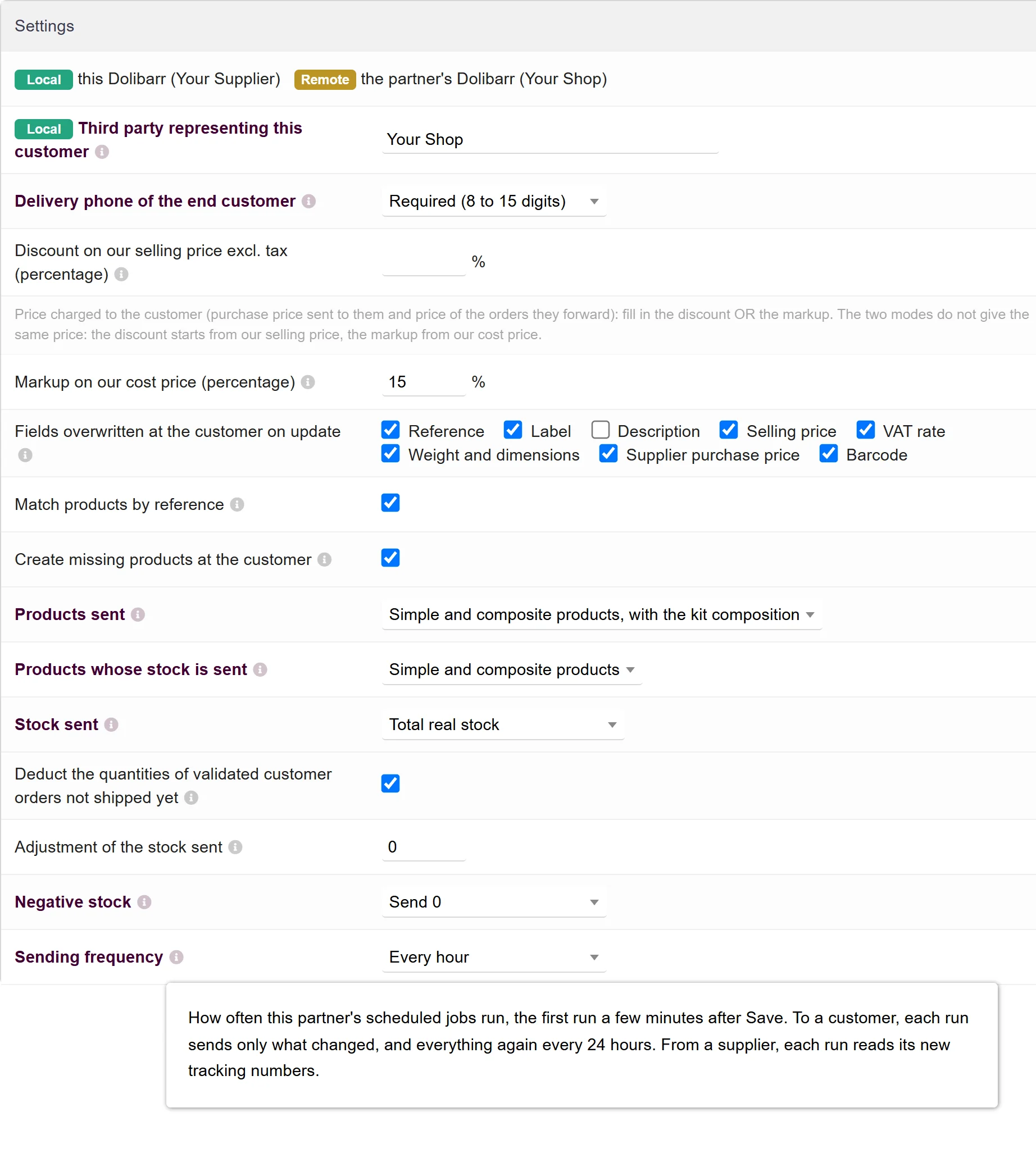
The supplier's Dolibarr sends its catalogue every hour by default, or every 2, 4 or 6 hours. Each run sends only the products that changed, and the whole catalogue goes again once a day. A product carries its reference, label, description, selling price, VAT rate, weight and dimensions, barcode, and the price the reseller pays. Kits arrive with their composition.
That price is the supplier's to set: a discount on its selling price, or a markup on its cost price. At the reseller, it becomes the purchase price from this supplier. Products the reseller already has are matched by their reference, and the others are created. After that, only the fields the supplier ticked are updated.
Stock, into a warehouse kept for the supplier
At the same frequency, the supplier's stock lands in the reseller's warehouse for this supplier. The supplier chooses what it sends: its total real stock or the sum of chosen warehouses, minus, if it wants, the quantities of validated customer orders not shipped yet. A product no longer for sale is sent at 0, so the reseller stops selling it.
Orders, from the reseller to the supplier
When the reseller validates a shipment from that warehouse, its Dolibarr orders those quantities from the supplier. The supplier gets a validated order, for the third party that represents the reseller, with the end customer as delivery contact. Its customer reference is the reseller's order.
If the supplier refuses the order, the shipment stays a draft and the reseller sees the reason, in its own language. If the supplier does not answer within 30 seconds, the validation is refused: validate again later. A partial shipment orders only its own quantities.
Tracking numbers, from the supplier to the reseller
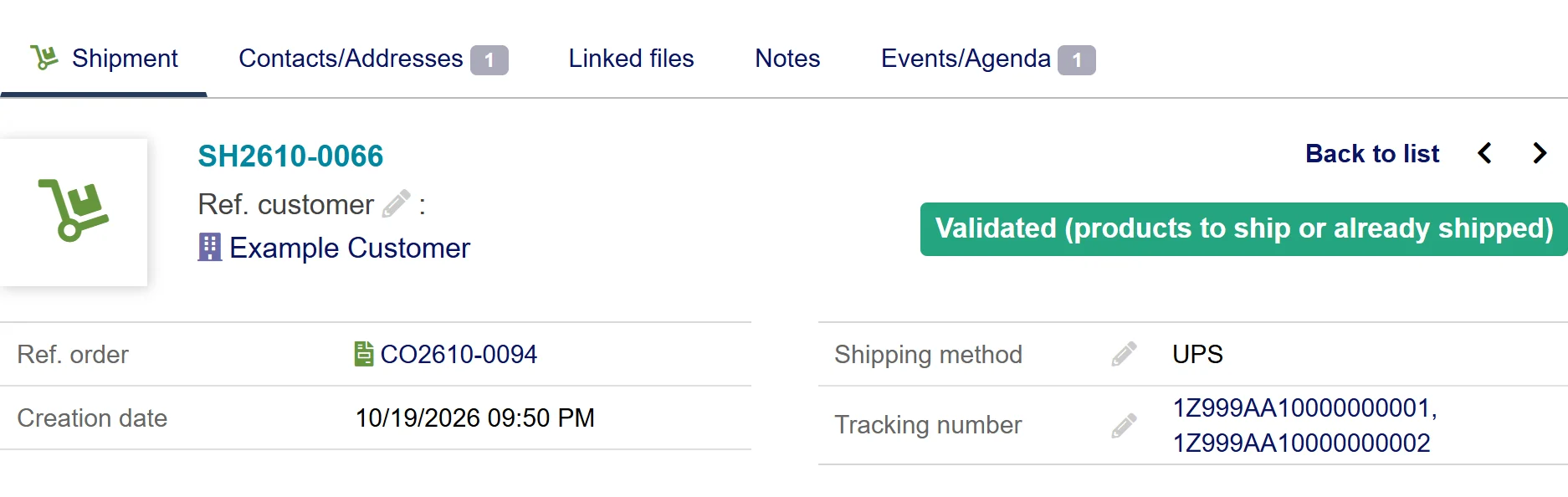
At the reseller, a job reads the supplier's tracking numbers, every hour by default, and writes them on its shipments with the carrier. A supplier order sent in several parcels adds each number.
Invoices, to create at the reseller
The reseller's Partner supplier invoices page lists the supplier's validated invoices and credit notes. Create the supplier invoice creates it, with the payments already made at the supplier. Link attaches a supplier invoice the reseller already typed in.
One health light per partner
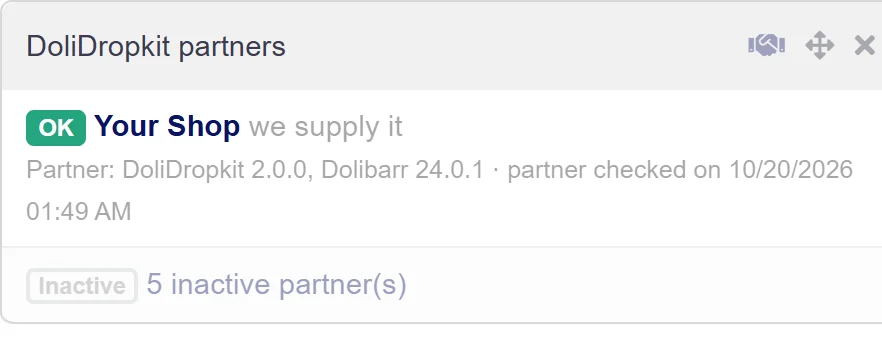
On the home page, the DoliDropkit partners widget shows one line per active partner: green when everything works on both sides, orange when something needs a look, red when exchanges are broken. Each line says what to do. The journal keeps every run and every order, 90 days by default.
Every flow in detail: How DoliDropkit works.
What each side sets up
Each side sets up only its own Dolibarr. The supplier adds a customer record for the reseller, the reseller a supplier record for the supplier. On each side, Create the API user creates this partner's user and shows a pairing code, to send privately. The other side pastes it into its record and clicks Connect. What is left is to fill in the settings, each with its tooltip, then tick Active partner on both sides.
A partner's API user has only the DoliDropkit permission. It reaches only this partnership, and nothing through Dolibarr's own API. Deleting the partner disables that user and removes its key.
You need Dolibarr 17 to 24, on MySQL, MariaDB or PostgreSQL, with PHP 7.4 to 8.3, each Dolibarr reachable from the other over HTTPS (or HTTP on a private network), and Dolibarr's scheduled jobs running on both sides. Step by step, with screenshots: Setting up DoliDropkit.
What DoliDropkit does not do
DoliDropkit does not copy cancellations, send alert emails or product photos, add a dropship fee, or order restocking for the reseller's own stock. It works in each Dolibarr's main company. The full list, with what to do instead, is on the DoliDropkit page.
Discover DoliDropkit
What each flow carries, what you need, the price and the common questions, on one page.
See DoliDropkitFrequently Asked Questions
- Do I need a server or an ERPkit account?
- No. The two Dolibarrs call each other directly. DoliDropkit calls no ERPkit server.
- Can a reseller work with several suppliers?
- Yes. At the reseller, each supplier has its own record, its own warehouse and its own link fields.
- Can the reseller keep its own descriptions?
- Yes, if the supplier does not tick the description. After a product is created, only the fields the supplier ticks in Fields overwritten at the customer on update change at the reseller.
- What does the reseller see when an order does not go through?
- The shipment stays a draft and the message says why, in the reseller's language: supplier unreachable, delivery address incomplete, phone missing. Fix it, then validate again.
Also from ERPkit
Does the reseller also sell online, on Shopify or Leroy Merlin for example? ERPkit Sync connects the same Dolibarr to its marketplaces: prices and stock go out from Dolibarr, orders and invoices come in. How product sync works.